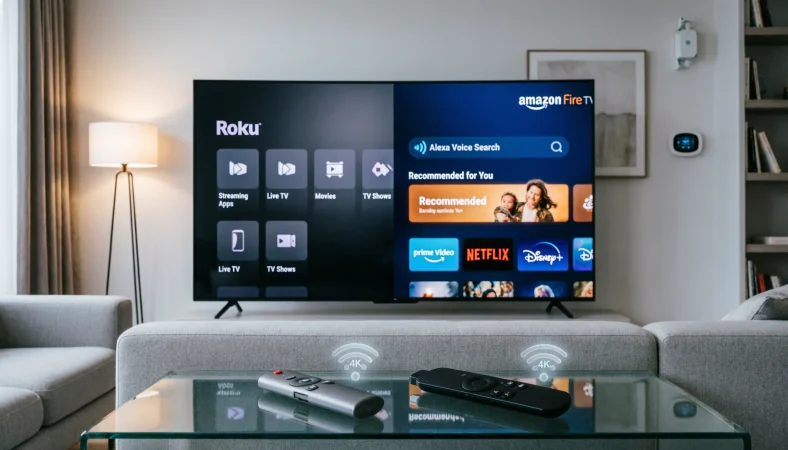
Roku and Firestick are both streaming platforms that turn a compatible television into a connected entertainment system, but they take different approaches. Roku emphasizes a simple interface and broad content discovery, while Fire TV Stick integrates closely with Amazon services and Alexa. The better choice depends on your preferred apps, voice assistant, smart home ecosystem, and viewing habits.
Choosing between Roku or Firestick can seem straightforward until you compare the interface, available apps, voice controls, picture quality, smart home features, and overall user experience. Both devices let you stream movies, television shows, live content, music, and other services through an internet connection, but they are not identical.
Roku is best known for its straightforward operating system and content focused interface. Amazon Fire TV Stick, commonly called Firestick, places greater emphasis on Amazon services, Alexa, personalized recommendations, and integration with the wider Amazon ecosystem. That distinction matters because the device you choose can affect how quickly you find content, how easily you control your television, and how naturally the system fits into your home.
This guide explains the differences in plain language so you can choose based on actual needs rather than brand popularity.
Roku vs Firestick: What’s the Difference?
Roku and Firestick perform the same basic job, but their software ecosystems and user experiences are different. Roku is a streaming platform offered through Roku players, streaming sticks, and televisions with Roku built in. Firestick refers to Amazon Fire TV Stick devices that connect to a television through HDMI.
| Feature | Roku | Firestick |
| Main platform | Roku OS | Fire TV platform |
| Manufacturer | Roku | Amazon |
| Voice assistant | Roku voice features and compatibility with Alexa | Alexa |
| Content discovery | Strong cross service discovery | Strong Amazon focused discovery |
| Smart home integration | Roku, Google Home, Apple Home, Alexa | Strong Alexa and Amazon integration |
| 4K options | Available on selected Roku models | Available on selected Fire TV Stick models |
| Dolby Vision | Available on selected models | Available on selected models |
| Wi Fi | Depends on model | Depends on model |
| Interface style | Simple and app focused | Content and recommendation focused |
| Amazon integration | Available through apps and Alexa compatibility | Deep integration |
| Apple AirPlay | Supported on compatible Roku devices | Availability depends on device and application |
| Best suited to | People who value simplicity | People invested in Amazon and Alexa |
Roku’s current Streaming Stick 4K supports 4K resolution, Dolby Vision, HDR10+, and long range Wi Fi, while its interface focuses heavily on finding entertainment across apps.
Amazon’s current Fire TV range includes several Fire TV Stick models, including the Fire TV Stick HD, Fire TV Stick 4K, Fire TV Stick 4K Plus, Fire TV Stick 4K Select, and Fire TV Stick 4K Max. Amazon’s specifications show that higher end models can support features such as Dolby Vision, HDR10+, Dolby Atmos, and newer Wi Fi standards. (Amazon Developer)
The short version
Roku generally wins for people who want a clean and uncomplicated streaming experience.
Firestick is particularly attractive to people who already use Amazon services or Alexa.
Both can provide high quality streaming, but capabilities vary significantly by model.
Your choice should depend on ecosystem, interface, content habits, and hardware requirements rather than brand name alone.
Is Roku or Firestick a Feature, Platform, or Device Question?
The comparison is slightly confusing because Roku and Firestick don’t describe exactly the same thing.
Roku is both a company and a broader streaming platform. It offers standalone players, streaming sticks, and televisions with Roku software built in. A Roku player is a separate device that connects to a television through HDMI. Roku also licenses its television platform to television manufacturers. (Roku)
Firestick, meanwhile, is the common name people use for Amazon’s Fire TV Stick line. These are compact streaming devices that connect to a television and provide access to streaming applications and services.
That distinction is important when comparing prices and specifications. Saying “Roku” could refer to an inexpensive streaming stick, a more powerful Roku player, or a television with Roku software built in. Saying “Firestick” generally refers to one of Amazon’s streaming sticks, but different generations and models can have very different capabilities.
In other words, you shouldn’t assume that every Roku device competes directly with every Firestick. A basic HD streaming stick should not be compared with a premium 4K device simply because both carry the same brand family.
Roku: Where It Works Best
Roku has built its reputation around simplicity. Its home screen generally makes applications and entertainment destinations easy to access without requiring users to understand a complicated ecosystem.
For someone who simply wants to turn on the television, select a streaming service, and start watching, that simplicity can be a major advantage.
Workplace and office example
Imagine a small office that uses a television for presentations, company announcements, training videos, or occasional entertainment. A straightforward interface can make the device easier for different employees to operate without extensive instructions.
Roku also supports compatibility with platforms such as Apple AirPlay, HomeKit, Google Home, and Alexa on compatible devices. (Roku)
Academic example
A teacher might use a Roku connected to a classroom display to access educational videos, streaming services, or other online material. The simple application based interface can reduce the amount of technical navigation required during a lesson.
The important point is not that Roku is specifically designed for education. Rather, its straightforward interface can make it practical in environments where multiple people may need to operate the television.
Technology example
Roku has also continued updating its operating system. In 2026, Roku introduced a redesigned home screen experience with sections for Home, Live TV, Sports, Subscriptions, Search, and other entertainment destinations. It also introduced personalized recommendations using artificial intelligence. (Roku)
Usage recap: Roku is particularly appealing when simplicity, broad entertainment discovery, and a clean interface matter most.
Firestick: Where It Works Best
Firestick has a different personality because it sits inside Amazon’s broader technology ecosystem.
If your household already uses Alexa speakers, Amazon services, compatible smart home devices, or other Amazon products, Fire TV can feel more natural.
Alexa is one of the clearest differences. Supported Fire TV devices allow users to use the voice button on the remote to search for content and perform other functions. Some devices can also work with compatible smart home equipment. (Amazon Developer)
Workplace example
A workplace that already uses Amazon devices may find Fire TV convenient because employees familiar with Alexa can quickly understand its voice controls.
Academic example
In an educational setting, a Fire TV Stick can provide access to streaming applications and web based entertainment services. Its usefulness depends largely on the applications and services required by the institution.
Technology example
The higher end Fire TV Stick 4K Max offers more advanced hardware and connectivity than entry level models. Amazon lists the second generation 4K Max with Wi Fi 6E, 16 GB of storage, Dolby Vision support, and Dolby Atmos capabilities. (Amazon Developer)
Usage recap: Firestick is particularly compelling for Amazon users, Alexa households, and people interested in advanced streaming hardware.
When You Should NOT Choose Roku or Firestick
There are situations where neither platform may be the ideal answer.
1. You need gaming performance beyond casual streaming
A streaming stick is primarily designed for entertainment applications. If your main goal is demanding console or PC gaming, you should consider a dedicated gaming platform instead.
2. Your television already has everything you need
A modern smart television may already provide the streaming applications you use. Adding another device can create unnecessary complexity.
3. You have unreliable internet service
Neither Roku nor Firestick can eliminate the limitations of a weak internet connection. Streaming quality depends heavily on network performance.
4. You are comparing outdated hardware
Older Roku and Firestick models may lack features found on newer devices. Always check the exact model before buying.
5. You need a specific application
Application availability can vary by platform and region. If one service is essential, verify compatibility before choosing your device.
6. You expect every model to support 4K
Not every Roku or Firestick provides 4K playback. Resolution depends on the specific model, television, content, and connection.
7. You want the most powerful possible streaming hardware
Entry level sticks are designed for affordability and convenience. Premium users may benefit from higher performance streaming players.
8. Your primary requirement is cable replacement
A streaming device gives you access to online services, but it does not automatically replace every function provided by a traditional cable package.
Common Mistakes and Decision Rules
| Correct sentence | Incorrect sentence | Explanation |
| I want Roku because I prefer a simple interface. | I want Firestick because Roku has no streaming apps. | Both platforms support many major streaming services. |
| I prefer Firestick because I use Alexa. | I prefer Firestick because Roku cannot use voice control. | Compatible Roku devices also offer voice features. |
| I need a 4K Roku for my 4K television. | Any Roku will automatically stream in 4K. | Resolution depends on the model. |
| I chose Firestick because I use Amazon services. | Every Firestick has identical features. | Amazon offers several models with different specifications. |
| I checked application compatibility before buying. | Every streaming service works exactly the same everywhere. | Availability can vary by region and platform. |
Decision Rule Box
Choose Roku when simplicity, straightforward navigation, and broad content discovery are your priorities.
Choose Firestick when Amazon services, Alexa integration, and Fire TV features fit your household better.
The most important rule is to compare the specific model, not merely the brand.
Roku or Firestick for Picture Quality
Picture quality is one area where the brand comparison can become misleading.
A premium Roku can provide excellent 4K HDR performance. For example, Roku Streaming Stick 4K supports 4K resolution, Dolby Vision, HDR10+, and HLG on compatible televisions and content.
Firestick also offers models with advanced picture capabilities. Amazon lists Dolby Vision, HDR10, HDR10+, and HLG among supported formats on relevant Fire TV hardware. (Amazon Developer)
The television itself matters just as much. A 4K streaming device connected to an HD television cannot magically turn the panel into a native 4K display.
Content also matters. A streaming service must provide compatible 4K or HDR content, and your internet connection must be capable of delivering it consistently.
So if picture quality is your priority, compare these four things:
- Streaming device capabilities
- Television capabilities
- Content availability
- Internet performance
Roku or Firestick for Ease of Use
Ease of use is subjective, but Roku has traditionally positioned itself around straightforward navigation.
Its current interface continues to emphasize direct access to entertainment categories and applications. Roku’s 2026 interface updates also added personalized recommendations while retaining access to applications and content hubs. (Roku)
Fire TV takes a more content centered approach. Instead of simply presenting applications, the experience can place shows, movies, recommendations, and Amazon services prominently within the interface.
This can be useful if you enjoy recommendations. It can also feel busier to someone who simply wants to open an application quickly.
For older adults, children, guests, or households with several people using the same television, interface familiarity can be more important than small differences in hardware performance.
Roku or Firestick for Smart Homes
Smart home compatibility can influence the decision significantly.
Roku supports integration with several major smart home ecosystems, including Google Home, Apple Home, and Alexa on compatible devices. (Roku)
Firestick naturally has a particularly strong relationship with Alexa. Compatible Fire TV devices can use Alexa through the remote, while supported setups can interact with compatible smart home products. (Amazon Developer)
This leads to a practical rule.
If your home already revolves around Alexa and Amazon products, Firestick may feel more integrated.
If your home uses a mixture of Apple, Google, and Amazon products, Roku’s broad compatibility may be attractive.
Roku or Firestick for Travelers
Both platforms can be useful when traveling because compact streaming devices are easy to carry.
Roku specifically promotes the portability of its Streaming Stick and describes using the device on different televisions while traveling.
However, travelers should remember that hotel and public Wi Fi networks can have restrictions. Some networks require browser based authentication, and not every television or network setup behaves identically.
A portable streaming device is therefore convenient, but it isn’t guaranteed to work everywhere without additional setup.
Roku and Firestick in Modern Technology and AI Tools
Artificial intelligence is increasingly appearing in streaming interfaces, but the two ecosystems approach personalization differently.
Roku announced a 2026 home screen update featuring AI based personalized recommendations. The system can recommend shows, movies, and live events based on viewing behavior. (Roku)
Amazon’s Fire TV ecosystem has also emphasized personalized content discovery and Alexa based voice interaction. The company’s newer Fire TV development documentation also shows an evolving platform landscape, including Vega OS on newer Fire TV Stick hardware. (Amazon Developer)
This is important because streaming devices are no longer simply hardware adapters. They are increasingly software platforms that organize entertainment, recommendations, smart home controls, and voice interactions.
The result is that choosing a streaming device now involves choosing an ecosystem as much as choosing a piece of hardware.
Authority and Trust: What the Technology Actually Shows
A useful way to evaluate streaming devices is to separate marketing claims from specifications.
Roku’s official specifications confirm that its Streaming Stick 4K supports 4K playback, Dolby Vision, HDR10+, long range Wi Fi, and voice remote controls.
Amazon’s official specifications confirm that the Fire TV Stick 4K Max second generation includes Wi Fi 6E, 16 GB of storage, Dolby Vision support, HDR formats, and Dolby Atmos capabilities. (Amazon Developer)
These details demonstrate why general statements such as “Roku is better” or “Firestick is faster” aren’t enough. Different models can produce very different experiences.
Case Study 1: The simplicity focused household
Consider a household that uses Netflix, YouTube, Disney Plus, and several free streaming services. The family does not use Alexa extensively and wants everyone to find applications without much instruction.
For this type of household, Roku’s straightforward interface may be the more natural fit. Its current platform is designed around easy access to applications, live television, search, sports, subscriptions, and other entertainment categories. (Roku)
The concrete advantage isn’t necessarily a particular frame rate or processor specification. It is reduced friction during everyday use.
Case Study 2: The Amazon centered household
Now consider a household that already uses Alexa speakers and several compatible smart home products. The family frequently uses Amazon services and wants voice control to be part of the television experience.
A Firestick can fit that environment naturally because Alexa is built into compatible Fire TV remotes and Fire TV devices can interact with compatible smart home equipment. (Amazon Developer)
Here, ecosystem integration becomes the practical result rather than simply streaming performance.
Author bio: Written by an SEO content strategist and technology focused language writer specializing in clear comparison content, search intent, consumer technology, and people first educational publishing.
How to Choose the Right One
Before purchasing, consider these questions.
- Do you already use Alexa?
- Do you prefer a simple television interface?
- Do you own a 4K television?
- Do you need Dolby Vision?
- Do you use Apple Home or Google Home?
- Do you rely heavily on Amazon services?
- Do you need a portable device?
- Do you care about advanced Wi Fi performance?
- Do you want basic streaming or a more integrated smart home experience?
Your answers will usually make the choice much clearer.
Error Prevention Checklist
Always choose Roku when
- You want a simple interface.
- You prefer straightforward access to streaming applications.
- You want broad smart home compatibility.
- You value cross service content discovery.
- You want an easy device for a mixed household.
Consider Firestick when
- You already use Alexa.
- You rely heavily on Amazon services.
- You want deeper Amazon ecosystem integration.
- You want access to advanced Fire TV hardware options.
- You prefer voice control through Alexa.
- You are interested in features available on higher end Fire TV models.
Related Streaming Comparisons You Should Know
Once you understand Roku and Firestick, several related comparisons become easier:
- Roku vs Google TV
- Fire TV vs Google TV
- Roku TV vs smart TV
- Streaming stick vs streaming box
- 4K vs HD streaming
- Dolby Vision vs HDR10
- Wi Fi 5 vs Wi Fi 6
- Smart TV vs streaming device
- Roku OS vs Fire TV software
- Alexa vs Google Assistant
These comparisons matter because a streaming device is only one part of the overall television experience.
FAQs
Is Roku or Firestick better?
Neither is universally better. Roku is ideal for simple navigation and content discovery, while Firestick is a strong choice for Amazon users and Alexa households.
Is Roku easier to use than Firestick?
Many users find Roku easier because of its simple, app focused interface. Firestick emphasizes content recommendations and Amazon services, so the better choice depends on personal preference.
Does Roku have more apps than Firestick?
Not necessarily. Both offer many major streaming services, but app availability varies by device, country, and service. Check whether the specific apps you need are supported.
Does Firestick have better picture quality than Roku?
Not automatically. Picture quality depends on the exact model. Premium Roku and Fire TV devices can both support advanced formats such as 4K, HDR, and Dolby Vision on compatible hardware.
Is Roku good for a 4K television?
Yes. Roku offers devices designed for 4K televisions. Roku Streaming Stick 4K supports 4K resolution along with Dolby Vision and HDR10+ on compatible equipment and content.
Is Firestick good for Alexa users?
Yes. Firestick is a strong choice for Alexa users because compatible Fire TV devices offer Alexa integration through the remote and support compatible smart home devices.
Can Roku work with Alexa?
Yes. Roku lists Alexa among its supported smart home integrations on compatible devices. (Roku)
Which is better for an older television?
Either can work well if the television has the required HDMI connection and supports the selected device. Roku and Fire TV both offer models designed to upgrade televisions for modern streaming.
Which is better for streaming in 2026?
It depends on your priorities. Roku is great for simple navigation and content discovery, while Firestick is a strong choice for Amazon users, Alexa households, and advanced Fire TV features.
Conclusion:
The choice between Roku or Firestick ultimately comes down to ecosystem, interface, hardware, and personal viewing habits rather than a single universal winner. Roku is an excellent option for people who want straightforward navigation and broad entertainment discovery. Firestick is particularly appealing if Alexa and Amazon services already play a major role in your home.
For a basic and uncomplicated streaming experience, Roku deserves serious consideration. For an Amazon centered smart home or a household that relies heavily on Alexa, Firestick may be the better fit.
Most importantly, compare the specific device model, not just the brand. Current Roku and Fire TV products range from basic HD streaming devices to premium 4K hardware with advanced HDR, audio, and wireless capabilities.