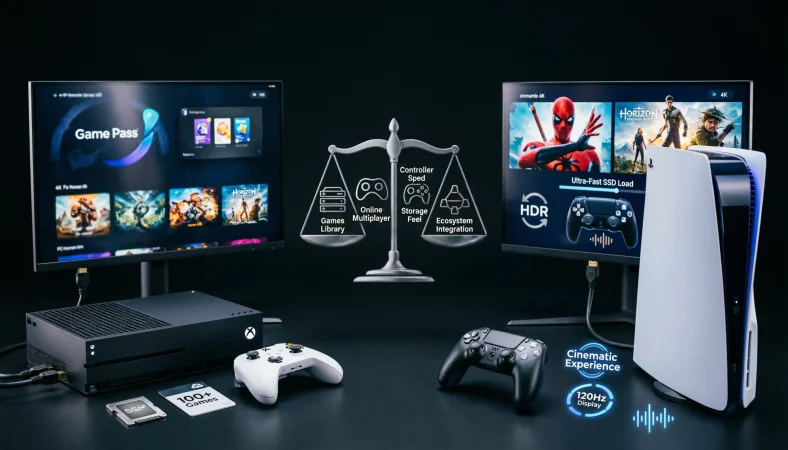
If you are comparing Xbox or PS5, the better choice depends less on raw performance and more on the games, services, accessories, and gaming habits you value. Xbox offers strong backward compatibility, Game Pass integration, and close links with PC gaming, while PS5 emphasizes its distinctive game library, fast SSD experience, immersive controller features, and PlayStation Plus ecosystem.
Choosing between Xbox or PS5 can feel surprisingly difficult. Both are powerful current generation gaming platforms, both support high resolution gaming and fast loading, and both have extensive online services. Yet the two ecosystems are designed around somewhat different priorities. Xbox refers to Microsoft’s console platform, while PS5 refers to Sony’s PlayStation 5 console family. The confusion often comes from comparing specifications alone. A console can have impressive hardware and still be the wrong choice if your favorite games, friends, subscriptions, or accessories belong elsewhere. This guide explains the major differences so you can make a practical decision rather than simply choosing based on brand loyalty.
Xbox vs PS5: What’s the Difference?
Xbox and PS5 are competing console ecosystems rather than two versions of exactly the same product.
When people say Xbox in this comparison, they usually mean the current Xbox Series X or Xbox Series S family. Xbox Series X is the higher performance console, while Xbox Series S is a smaller, less expensive digital focused option. Microsoft currently lists Series X configurations with 1 TB or 2 TB storage, while Series S is offered with 512 GB or 1 TB options depending on configuration. (xbox.com)
PS5 refers to Sony’s PlayStation 5 platform. Depending on the market and configuration, buyers can choose among different PS5 hardware options, including models designed around either disc based or digital gaming.
Xbox is particularly attractive to people who want an integrated console and PC ecosystem.
PS5 is particularly attractive to people who prioritize PlayStation’s game ecosystem and controller experience.
Neither platform is universally better.
The best choice depends on what you actually play.
Xbox or PS5: Which One Is Better?
There is no single answer because “better” can mean several different things.
If better means subscription value and integration with PC gaming, Xbox has a particularly strong argument. Xbox Game Pass provides access to a changing library of games, and Microsoft also supports Xbox gaming across Windows PCs and compatible devices. Microsoft notes that Game Pass availability, features, games, and supported platforms vary by plan and region. (xbox.com)
If better means access to Sony’s distinctive first party experiences, PS5 can be the more attractive choice.
If better means hardware power, the comparison should focus on specific models rather than treating every Xbox as equivalent to every PS5. Xbox Series S, for example, is designed around 1440p gaming and can upscale to 4K, whereas Series X is designed for native 4K gaming and can target up to 120 frames per second with supported content and displays. (xbox.com)
PS5 also supports 4K and 120 Hz output with compatible games and displays. Sony’s official documentation confirms HDMI 2.1 support and 4K 120 Hz output. (PlayStation)
So the real question isn’t simply which console is stronger.
It is which ecosystem gives you the games, services, hardware, and social experience you actually want.
Is Xbox or PS5 a Hardware, Ecosystem, or Usage Issue?
This comparison is mainly an ecosystem and purchasing decision, not a simple hardware specification contest.
A console’s processor and graphics hardware matter, but they are only part of the experience.
Hardware
Xbox Series X is a powerful console with a custom Zen 2 CPU, 16 GB of GDDR6 memory, a 12 teraflop GPU, and an NVMe SSD. Microsoft lists true 4K gaming and support for up to 120 frames per second on supported content. (xbox.com)
PS5 also provides high speed SSD storage, 4K output, high refresh rate support, HDR, and variable refresh rate capabilities. (PlayStation)
Services
Xbox places considerable emphasis on Game Pass and cross platform access.
PlayStation uses PlayStation Plus, with different membership levels providing different benefits. Sony also supports cloud streaming through PlayStation Plus Premium on PS5. (PlayStation)
Usage
Your own habits may matter more than small technical differences.
Someone who owns a gaming PC and regularly uses Microsoft services may naturally fit into the Xbox ecosystem.
Someone whose friends play on PlayStation or who strongly prefers PlayStation titles may find PS5 more useful.
Using Xbox as Your Main Gaming Platform
Xbox is more than a console. Microsoft has built Xbox into a broader gaming ecosystem involving consoles, Windows PCs, subscriptions, cloud gaming, and backward compatibility.
One important advantage is continuity.
Microsoft states that Xbox Series S supports Xbox One games, while compatible accessories can also carry forward. (xbox.com)
Xbox Series X also includes features such as Quick Resume, which allows players to move between supported games and return to previous sessions quickly. (xbox.com)
Workplace example
Imagine an employee who occasionally plays games after work and already uses a Windows PC.
Xbox may make practical sense because the person can remain within a familiar Microsoft gaming ecosystem rather than maintaining completely separate systems.
Academic example
A university student who has limited space and wants a compact gaming machine might consider Xbox Series S. Microsoft positions Series S as a smaller console designed around digital gaming, with 1440p gaming and support for up to 120 frames per second on supported content. (xbox.com)
Technology example
Xbox also has a strong connection to cloud gaming. Microsoft states that Xbox Cloud Gaming is available through Game Pass on supported devices and that the available library varies according to plan, region, platform, and time. (xbox.com)
Xbox usage recap
Xbox makes particular sense for players who value subscription access, PC integration, backward compatibility, and Microsoft’s wider gaming ecosystem.
Using PS5 as Your Main Gaming Platform
PS5 focuses heavily on fast storage, immersive gameplay features, high quality visual output, and the PlayStation software ecosystem.
One of its most recognizable features is the DualSense controller. The controller’s adaptive triggers and haptic feedback can provide different physical sensations depending on how a game is designed.
PS5 also supports internal SSD expansion through compatible M.2 drives. Sony states that compatible expanded storage can be used to play PS5 and PS4 games directly when installed correctly. (PlayStation)
Workplace example
For a professional who wants a dedicated entertainment system rather than a platform connected closely to a work computer, PS5 can provide a straightforward console focused experience.
Academic example
A student who shares a television with roommates may appreciate PS5 features that allow quick access to different games and media applications without needing a separate gaming computer.
Technology example
PS5 supports 4K output, 120 Hz output, variable refresh rate, HDR, and HDMI 2.1 features when compatible equipment and software are used. (PlayStation)
Sony also offers cloud streaming through PlayStation Plus Premium for supported games, allowing selected titles to be streamed without downloading them to the console. (PlayStation)
PS5 usage recap
PS5 is particularly appealing to players who value PlayStation’s game ecosystem, immersive controller technology, fast storage, and high resolution gaming.
When You Should NOT Choose Xbox or PS5
There are situations where choosing either platform without considering your circumstances can lead to disappointment.
1. Don’t choose solely because of specifications
A specification sheet doesn’t tell you which games you will actually enjoy.
2. Don’t choose Xbox Series S when maximum graphical performance is your priority
Series S is intentionally less powerful than Series X and is designed around a lower target resolution. Microsoft identifies 1440p as its gaming resolution target. (xbox.com)
3. Don’t choose PS5 simply because someone says it has better graphics
Actual visual quality depends on the game, display, resolution, frame rate settings, and developer implementation.
4. Don’t choose either console without checking your friends’ platform
Online multiplayer compatibility varies by game. If your main gaming group is concentrated on one platform, that can significantly affect your experience.
5. Don’t ignore subscription costs
The initial console purchase is only one part of the long term cost.
6. Don’t ignore storage
Modern games can consume substantial storage. Expansion options should be considered before buying.
7. Don’t assume every game is available everywhere
Game libraries vary by platform, region, licensing arrangements, and time.
8. Don’t buy based entirely on brand loyalty
Microsoft and Sony both have strengths. Your actual priorities should determine the decision.
Common Mistakes When Choosing Xbox or PS5
Decision Rule Box
- If subscription access, PC integration, backward compatibility, and Microsoft ecosystem features are your priorities, Xbox deserves serious consideration.
- If PlayStation’s games, DualSense features, and PlayStation Plus ecosystem are more important, PS5 may be the better fit.
- If maximum Xbox hardware performance is your goal, compare Series X rather than Series S with PS5.
Xbox or PS5 in Modern Technology and AI Tools
The modern console is no longer an isolated gaming machine.
Both platforms increasingly connect gaming with streaming, cloud services, digital storefronts, online communities, and companion applications.
AI is also becoming part of the broader gaming industry. Artificial intelligence can assist with game development, animation, testing, accessibility, recommendation systems, moderation, and player services.
For consumers, however, the most important question is not whether a console uses AI somewhere in its ecosystem.
The practical question is whether those technologies improve the experience.
A good purchasing decision should therefore focus on measurable benefits such as faster loading, better image quality, smoother frame rates, useful accessibility features, and broader game access.
Xbox or PS5: What Matters More Than Raw Power?
The biggest mistake in console comparisons is treating hardware as the entire product.
A gaming platform has at least five important layers.
Hardware: How powerful and capable is the console?
Games: Does it offer the titles you want?
Services: Do its subscriptions provide useful value?
Community: Are your friends and multiplayer groups there?
Longevity: Will the platform continue to suit your habits?
A console that wins one category can lose the overall decision.
For example, a player might prefer Xbox because they already have a large compatible library and use PC gaming regularly.
Another player might prefer PS5 because the PlayStation library and controller features matter more.
There is no contradiction in reaching different conclusions.
Etymology and History of the Two Names
The word Xbox comes from Microsoft’s original console branding, introduced with the first Xbox in 2001. The name is connected to Microsoft’s DirectX technology, which played an important role in PC graphics and gaming.
The PlayStation name belongs to Sony’s long running gaming platform. The original PlayStation launched in the 1990s, establishing a console brand that eventually developed into the PS5 generation.
The names therefore represent much more than individual machines. They identify long standing gaming ecosystems with their own software libraries, services, communities, controllers, and hardware traditions.
An Expert Style Perspective
“The best console is not necessarily the one with the strongest specification sheet. It is the platform that gives a particular player the greatest combination of games, services, comfort, community, and long term value.”
That principle is useful whenever you compare competing technology products.
Specifications are measurable.
Personal value is contextual.
Two Practical Case Studies
Case Study 1: The PC gamer
Consider a player who already owns a Windows gaming PC and frequently uses Microsoft services.
The player wants a console for the living room but wants subscription access and gaming features that complement the existing PC.
Xbox becomes a logical candidate because Microsoft supports Xbox gaming across console and PC environments, while Game Pass can provide access across supported platforms. (xbox.com)
Concrete result: The player can maintain a more unified gaming ecosystem instead of dividing purchases and services between unrelated platforms.
Case Study 2: The 4K television owner
Now consider a player with a modern 4K television and a preference for high resolution console gaming.
Xbox Series X supports true 4K gaming and up to 120 frames per second with compatible content and displays. PS5 also supports 4K output and 120 Hz output when the game and display support those features. (xbox.com)
Concrete result: Either platform can make effective use of a suitable high refresh 4K display, meaning the buyer should focus more heavily on games, services, controller preferences, and ecosystem compatibility.
Error Prevention Checklist
Always consider these factors before choosing
- Your favorite games.
- Your friends’ platforms.
- Subscription preferences.
- Your television or monitor.
- Storage requirements.
- Physical versus digital game preferences.
- PC gaming habits.
- Long term accessory plans.
Never make the decision based only on
- Brand popularity.
- A single specification.
- One comparison video.
- A friend’s personal preference.
- Marketing claims without context.
- Console appearance.
- One exclusive game if you don’t actually intend to play it.
Related Gaming Comparisons You Should Understand
If you’re researching Xbox and PS5, several related comparisons can help you understand the broader console market.
- Xbox Series X versus Xbox Series S
- PS5 disc edition versus PS5 digital edition
- Xbox Game Pass versus PlayStation Plus
- Xbox controller versus DualSense controller
- Digital games versus physical games
- Console gaming versus PC gaming
- 4K gaming versus 1440p gaming
- 60 frames per second versus 120 frames per second
- Internal SSD versus external storage
- Cloud gaming versus local gaming
These comparisons are often more useful than asking which brand is simply “better.”
FAQs
Is Xbox or PS5 better for gaming?
Neither is universally better. Xbox can be more attractive for Game Pass, PC integration, and backward compatibility, while PS5 can be more attractive for PlayStation games, DualSense features, and the PlayStation Plus ecosystem.
Which is more powerful, Xbox or PS5?
The answer depends on the specific Xbox model. Xbox Series X has a 12 teraflop GPU and 16 GB of GDDR6 memory, while Xbox Series S is a lower performance model. (xbox.com)
Comparing PS5 with Series X is more appropriate than comparing PS5 with Series S.
Should I buy Xbox or PS5 for exclusive games?
Choose the platform that contains the games you actually want to play. Exclusive availability can change over time, so check the current platform availability of specific titles before purchasing.
Is Xbox better than PS5 for online gaming?
Neither platform is automatically better for every multiplayer game. The important factors are the specific game, your subscription, network connection, cross platform support, and where your friends play.
Is PS5 better than Xbox for graphics?
Both can provide high quality visuals. PS5 supports 4K and 120 Hz output on compatible equipment, while Xbox Series X supports true 4K and up to 120 frames per second with supported content and displays. (PlayStation)
Which console is better for a 4K TV?
Both can work very well with a suitable 4K television. Xbox Series X is designed around true 4K gaming, while PS5 supports 4K output and 120 Hz output with compatible games and displays. (xbox.com)
Is Xbox Series S worth buying instead of PS5?
The Xbox Series S can be a good choice if you want a compact, digital-only console and don’t need native 4K gaming. However, if you prioritize stronger graphics and performance, a more powerful console may be the better option.
Which has better subscription services, Xbox or PS5?
Xbox Game Pass and PlayStation Plus offer different libraries and features. Xbox is strong for PC integration, while PlayStation Plus offers multiple membership tiers and cloud streaming with Premium. The better choice depends on your games and preferred features.
Can PS5 games be stored on external USB storage?
PS5 can store compatible PS4 and PS5 games on supported external USB drives, but PS5 games need to be transferred back to the internal SSD before they can be played. Sony documents this storage behavior in its PS5 support information. (PlayStation)
Which console should a beginner buy?
A beginner should choose based on budget, preferred games, subscription preferences, friends, display, and whether physical games matter. There is no universal beginner console because different players have different needs.
Conclusion:
The right choice between Xbox and PS5 depends on the kind of gamer you are.
Xbox is compelling for players who value Game Pass, PC integration, backward compatibility, cloud gaming, and Microsoft’s broader gaming ecosystem. Xbox Series X is the high performance choice within the Xbox family, while Series S offers a smaller and more accessible digital focused approach. (xbox.com)
PS5 is compelling for players who prioritize PlayStation’s game ecosystem, DualSense controller features, high speed SSD storage, and PlayStation Plus. Sony also provides features such as 4K output, 120 Hz support, variable refresh rate, storage expansion, and cloud streaming through PlayStation Plus Premium. (PlayStation)
The smartest decision is therefore not to ask which console wins every category.
Ask which platform fits your gaming life.
If your friends, games, subscription preferences, and PC habits point toward Microsoft, Xbox may be the better investment.
If your preferred games, controller experience, and PlayStation ecosystem matter most, PS5 may be the better choice.
In other words, the winner isn’t determined only by hardware. The best console is the one you will actually use, enjoy, and keep using for years.











1 thought on “Xbox or PS5: Which Is Better? Performance, Games, Price & Features Compared For 2026”